Use Bing's AI Dashboard to Optimize Your Webflow Site
Learn to use Bing AI data to refine your Webflow site architecture. Master grounding queries and citation tracking to rank in ChatGPT & Copilot. 2026 Guide.
Most people open Bing's AI Performance dashboard looking for numbers. Citations. Queries. Trends.
But the real value isn't the metrics themselves.
It's the feedback loop they create.
When Microsoft launched the AI Performance dashboard in February 2026, it gave Webflow founders something they've never had: first-party data on how AI systems interpret their sites. Not how users see them. Not how Google ranks them. How machines read them, and whether they understand the content well enough to cite it in an answer.
For the first time, you're not guessing. You're seeing signals about how your structure, content, and decisions are being recognized. And for Webflow founders specifically, that changes how optimization works.
The anchor for everything that follows is this: AI visibility is an architecture problem, not a content volume problem. The dashboard gives you the data to prove it, and the feedback loop to fix it.
Grounding Queries Reveal Your Actual Direction
Founders often believe they control how their site is positioned.
Grounding queries show something different.
They're not search keywords in the traditional sense. They're the internal phrases Bing's AI generates when it reformulates a user's question before searching the index for candidate content. The queries where AI decided your site was relevant enough to reference in an answer. For a full breakdown of how grounding queries work technically, including how they differ from what users actually type, see our analysis of the AI Performance dashboard.
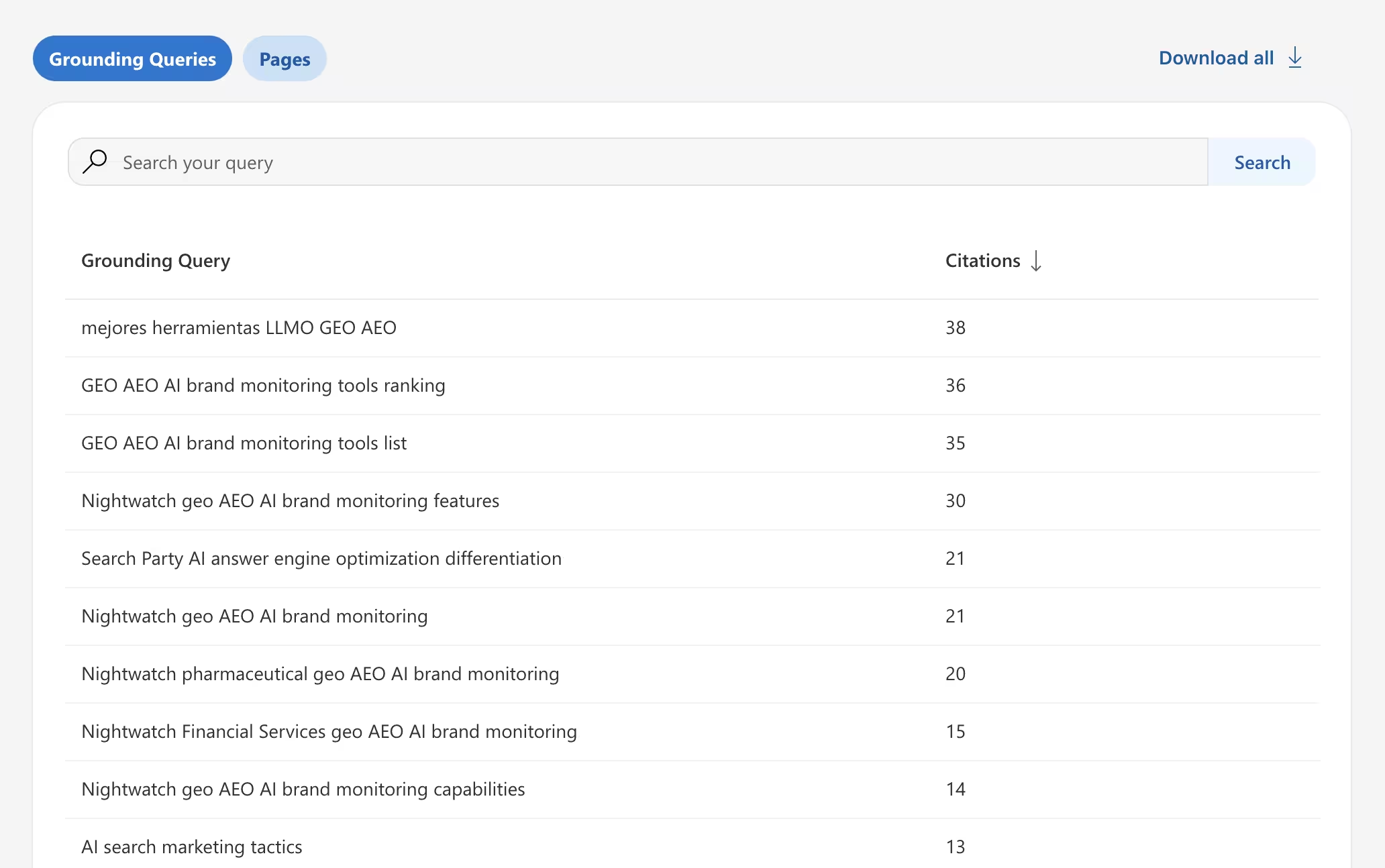
The practical question is simpler: do the grounding queries match the positioning you intended?
You've built pages around specific topics. Structured your CMS collections with intention. Designed your navigation to guide visitors through a deliberate flow. Grounding queries tell you whether AI systems arrived at the same understanding, or went somewhere else entirely.
When the queries match your positioning, that's confirmation. Your structure is communicating clearly.
When they don't, it usually isn't a keyword problem. It's a structural problem.
What Misalignment Looks Like in Webflow
Pages with unclear intent get associated with tangential queries. You built a page about "Webflow CMS best practices" but the grounding queries pulling it into AI answers are about "free website builders" or "Webflow pricing." The page is being found, but AI is interpreting its purpose differently than you intended. Usually this means the heading structure is too broad, or the page tries to cover adjacent topics without clearly anchoring its primary focus.
Overlapping topics across CMS items create ambiguity. You have three blog posts that all touch on "content strategy" from slightly different angles. AI can't determine which one is authoritative on the topic, so it either cites the wrong one or ignores all three. This is especially common in Webflow CMS collections where items are planned editorially but not architected for topical clarity.
Inconsistent internal linking weakens topic signals. Your navigation links to a service page, but your blog posts link to a different page covering a similar topic. AI uses internal linking to understand how your topics relate, when the signals are contradictory, the picture gets muddy.
The fix isn't "write more content." It's tighten your architecture. Clarify what each page is about. Consolidate where topics overlap. Let structure do the communicating.
Citations Show Where Trust Already Exists
Page-level citation data shows which URLs are referenced most often inside AI answers.
Most founders expect their core landing pages to appear here. Often, they don't.
Instead, AI tends to reference pages that have clear, descriptive headings that map directly to the content beneath them, contain focused sections that address a specific intent without meandering, and present information that's easy to extract, not buried in design-heavy layouts or scattered across interactive components.
This doesn't mean redesigning your entire site. It means recognizing patterns.
How to Read Your Citation Data
If one type of page gets cited more frequently, it's usually because the format makes information easier to retrieve. Study those pages. Not for what they say, but for how they're built.
Ask yourself: What's the heading structure? How are sections organized? How much of the page's meaning can you grasp from the HTML alone, stripped of all styling?
That's a design and architecture insight, not just a content insight.
Here's a concrete example. Say your Webflow site has a blog collection and a services collection. You might find that three blog posts account for 80% of your AI citations, while your service pages - the ones you care about most commercially - have zero. The blog posts probably have clear H2s that describe what each section covers, focused paragraphs beneath each heading, and a structure that's easy to parse from the DOM alone. Your service pages might look polished in the Designer but use styled text instead of semantic headings, bury key information inside tabs or accordions, or rely on visual hierarchy that doesn't translate to HTML.
Webflow gives you the tools to build pages that are visually rich and structurally clear at the same time. But only if you're thinking about both layers.
Low Citation Pages Are Signals, Not Failures
Seeing pages with low citation activity doesn't mean they're weak.
It usually means AI systems struggle to extract clear signals from them.
For Webflow sites, this happens in predictable ways.
Headings That Describe the Design Instead of the Topic
"Our Approach" tells an AI system nothing about what the section covers. "How We Structure Content Audits for SaaS Companies" communicates the topic even in isolation.
This is one of the most common patterns on Webflow sites. Headings are chosen for how they look in the layout, not for what they communicate to machines. The irony is that descriptive headings usually look better too - they give visitors immediate clarity about what they're about to read.
Styled Paragraphs Pretending to Be Headings
The page looks organized to a human, but the heading tags don't reflect that organization. What appears to be an H2 in the design is actually a paragraph with bold styling and a larger font size. AI systems read the DOM. They see a flat page with no structure - even if the visual design suggests otherwise.
In Webflow, this happens when designers use styled classes for visual heading treatments instead of assigning actual heading levels in the element settings. The fix takes seconds per element, but the impact across a CMS collection can be significant.
Inconsistent Entity Naming Across Pages
Calling the same concept "content strategy" on one page, "editorial planning" on another, and "content ops" on a third makes it harder for AI to build a coherent picture of your authority.
For Webflow CMS sites, this tends to creep in as collections grow. Early posts use one term, later posts drift to another, and no one audits for consistency because each page looks fine on its own. AI systems don't evaluate pages in isolation - they build a site-level understanding. Inconsistency fragments that understanding.
Improving AI recognition often comes down to closing these gaps. Not more content. Not more keywords. Just clearer structure.
Visibility Trends Show How Decisions Affect Recognition
The timeline view inside the dashboard is easy to overlook. But it's one of the most strategic parts of the data.
Every change you make - restructuring navigation, consolidating scattered pages into a focused hub, updating CMS templates with clearer heading structures - becomes visible through shifts in citation activity over time.
How to Use the Timeline as a Decision-Making Tool
Restructure your navigation? Watch the timeline. If new grounding queries appear or existing ones strengthen, you're seeing the direct effect of an architectural decision on AI perception.
Update your CMS template to include more descriptive section headings? The timeline will reflect whether that change improved retrievability across the entire collection - not just one page, but every item built on that template.
Consolidate three overlapping blog posts into one comprehensive page? Track whether the single page starts accumulating the citations that were previously scattered (or absent).
Instead of optimizing blindly, you start making iterative decisions based on how AI perception evolves. That's a fundamentally different way of thinking about optimization. Less about rankings. More about recognition.
The Patience Factor
The key is patience. AI systems don't re-evaluate your site overnight. Give structural changes two to three weeks to propagate through Bing's index and into the AI citation pipeline, then read the trend data with the change in mind.
There is one way to compress this timeline significantly - and it connects directly to everything above.
Why Faster Indexing Matters More Than Most Founders Realize
When AI systems rely on current information, the speed at which your updates are discovered becomes part of your strategy.
This is where IndexNow changes the game.
When you make structural improvements - clearer headings, better topic separation, updated CMS templates - those changes only affect AI citation data once search engines discover and re-index the updated pages. By default, that happens whenever Bing's crawler decides to revisit. Could be days. Could be weeks.
IndexNow shortcuts that wait. It notifies Bing (and other participating search engines) immediately when content changes, which means AI systems can reference the newest version of your pages far sooner than they otherwise would.
The Feedback Loop Gets Faster
For Webflow sites iterating on structure - which is exactly what the AI dashboard encourages you to do - IndexNow tightens the feedback loop dramatically.
The cycle looks like this: review your AI dashboard data, identify a structural issue (misaligned grounding queries, low citations on key pages, heading problems in a CMS template), make the fix in Webflow, publish, ping IndexNow, and start watching for the effect in your citation data days sooner than you otherwise would.
Without IndexNow, you make a change and wait. Possibly weeks. With it, you're often seeing the updated page re-indexed within minutes - which means the AI citation pipeline has access to your improved content almost immediately.
And because ChatGPT's web browsing also relies on Bing's index, faster indexing through Bing doesn't just affect your Bing AI visibility. It can accelerate how quickly your updates appear in ChatGPT responses too.
The technical setup is minimal - an API key and a small verification file hosted on your Webflow domain. We wrote the full step-by-step implementation: How to Set Up IndexNow on Webflow.
If you're actively using the AI dashboard to refine your site, IndexNow is what keeps the cycle moving.
The Real Shift: Optimization Is Becoming Architectural
AI dashboards don't replace SEO tools. They shift the focus.
Instead of asking "How do I rank higher?" founders start asking "How clearly does AI understand my site?"
That question leads to different decisions. Refining topic clusters instead of adding pages. Improving heading structure instead of layering on more schema. Aligning content direction with what grounding queries reveal AI is already associating with your site. Consolidating overlapping CMS items instead of publishing more.
For Webflow founders, this is the more natural way to think about it. You already care about structure. You already think in terms of hierarchy, flow, and clarity.
The AI dashboard extends that thinking from the visual layer into the machine-readable layer - and gives you data to work with instead of assumptions.
Showing up in AI isn't just about adding schemas and FAQs. It requires ongoing decisions about site architecture, content clarity, and how you interpret the signals in front of you.
The dashboard gives you the data. Your Webflow Designer gives you the control. The combination is what actually moves the needle.
Getting started: If you haven't set up Bing Webmaster Tools yet, the full walkthrough - including verification, sitemap submission, and your first 30 minutes in the dashboard - is here. Bing Webmaster Tools for Webflow: The AI Layer.
Understanding the data: For a deep dive on what the AI Performance dashboard actually shows, how grounding queries work, and what's still missing, we covered that here. Bing's Just Launched AI Search Analytics Dashboard Explained.
Closing the loop: Once you're making structural changes based on the dashboard, IndexNow ensures those changes reach Bing's index in minutes instead of weeks. Here's the Webflow setup guide.
Uncover deep insights from employee feedback using advanced natural language processing.
Get your content health score across ChatGPT, Perplexity, Gemini & Claude in 60 seconds.
Blogs
.avif)